01
See the whole picture.
A clear overview of your Mac, running containers and resource use. Double-click a container to focus on the details.
Actual host informationMeet a calmer way to work with Apple Container. Your containers, images and projects, together in a native Mac app.
macOS 26+ · Apple Silicon · Free & open source
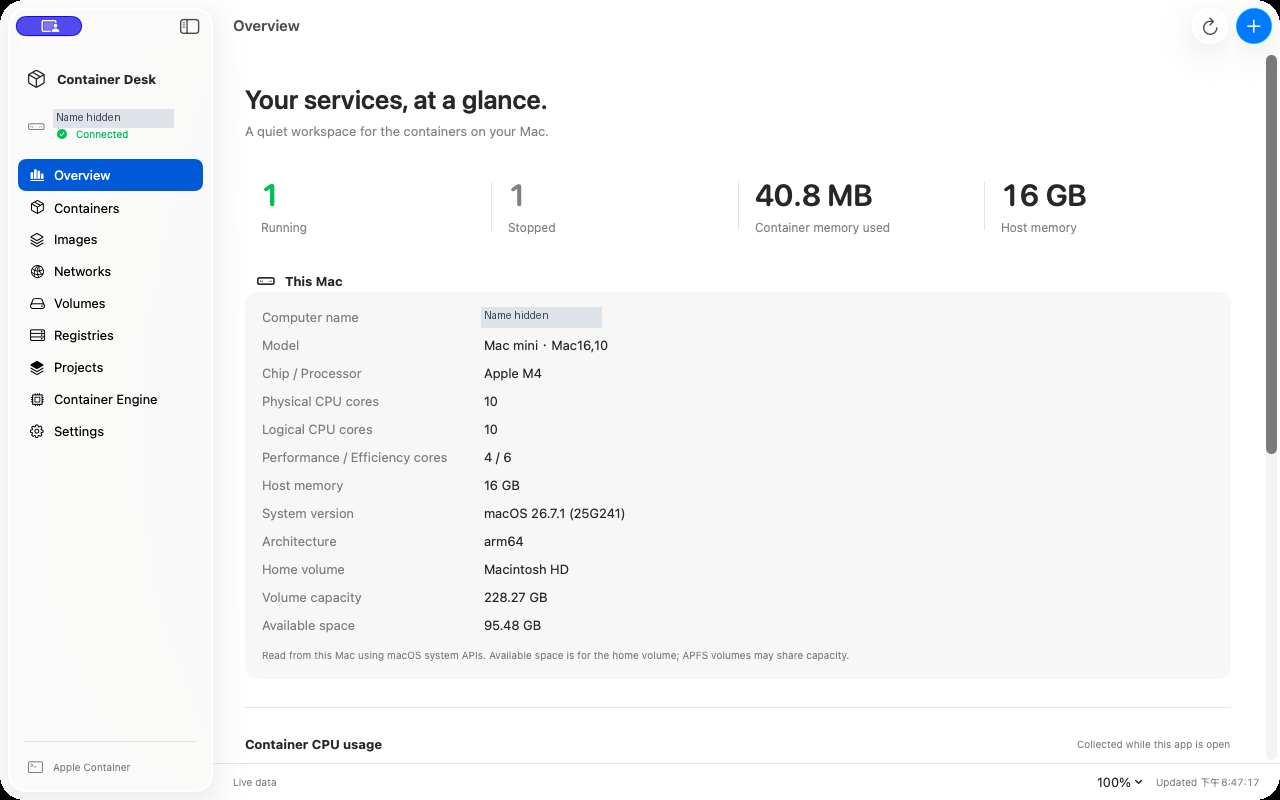
Real app captures from version 0.2.0. Host names are masked.
LESS FRICTION. MORE FLOW.
The controls you reach for every day, designed to feel at home on your Mac.
A clear overview of your Mac, running containers and resource use. Double-click a container to focus on the details.
Actual host informationSearch Docker Hub, inspect available architectures, download an image and configure your container in one flow.
Search. Choose. Deploy.Manage files, networks and volumes. Review batch actions, browse logs and open published web ports with a click.
The everyday essentialsImport supported Compose configurations and review Docker project conversions. Unsupported settings are clearly identified.
Review before you migrateA FEW CLICKS TO YOUR FIRST CONTAINER.
Open the DMG and drag Container Desk into Applications.
Use Container Engine to connect to or install the supported official Apple Container release.
Choose an image, set resources and ports, then create and start your container.
The current build is ad hoc signed and is not Apple-notarized. Read the installation guide if macOS blocks it. Apple Container is a separate installation.
Apple Silicon Macs running macOS 26 or later. The public release was tested with Apple Container 1.5.0 on the developer’s own M4 Mac mini.
Supported Compose settings can be imported and reviewed. Local Docker images and persistent data need separate migration. Selecting ARM64 or AMD64 is not binary conversion.
No. Container Desk is an independent, Apache-2.0 open-source application that manages the official Apple Container engine.
A small app for a more focused workflow.
Download for MacRelease notes →